Developer Guide
- Acknowledgements
- Setting up, getting started
- Design
- Implementation
- Documentation, logging, testing, configuration, dev-ops
- Appendix: Requirements
- Appendix: Instructions for manual testing
Acknowledgements
- Application based on SE-EDU AB3: https://github.com/se-edu/addressbook-level3
Setting up, getting started
Refer to the guide Setting up and getting started.
Design
 Tip: The
 .puml files used to create diagrams in this document docs/diagrams folder. Refer to the PlantUML Tutorial at se-edu/guides to learn how to create and edit diagrams.
Architecture
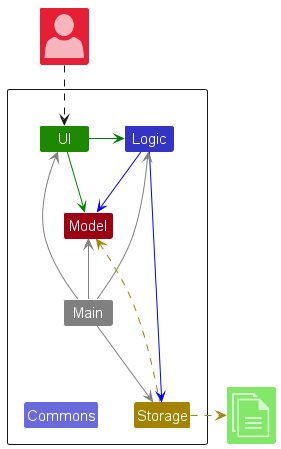
The Architecture Diagram given above explains the high-level design of the App.
Given below is a quick overview of main components and how they interact with each other.
Main components of the architecture
Main (consisting of classes Main and MainApp) is in charge of the app launch and shut down.
- At app launch, it initializes the other components in the correct sequence, and connects them up with each other.
- At shut down, it shuts down the other components and invokes cleanup methods where necessary.
The bulk of the app’s work is done by the following four components:
-
UI: The UI of the App. -
Logic: The command executor. -
Model: Holds the data of the App in memory. -
Storage: Reads data from, and writes data to, the hard disk or solid-state drive (SSD).
Commons represents a collection of classes used by multiple other components.
How the architecture components interact with each other
The Sequence Diagram below shows how the components interact with each other for the scenario where the user issues the command delete 1.
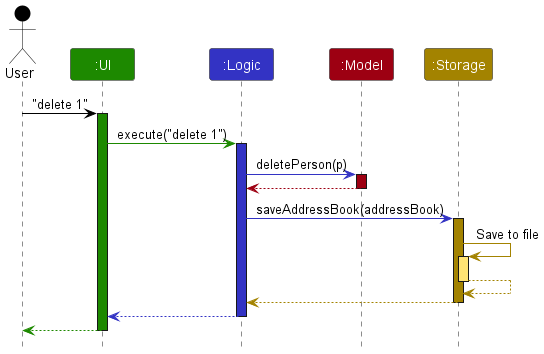
Each of the four main components (also shown in the diagram above),
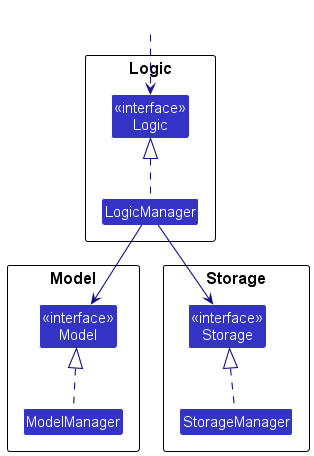
- defines its API in an
interfacewith the same name as the Component. - implements its functionality using a concrete
{Component Name}Managerclass (which follows the corresponding APIinterfacementioned in the previous point.
For example, the Logic component defines its API in the Logic.java interface and implements its functionality using the LogicManager.java class which follows the Logic interface. Other components interact with a given component through its interface rather than the concrete class (reason: to prevent outside component’s being coupled to the implementation of a component), as illustrated in the (partial) class diagram below.
The sections below give more details of each component.
UI component
The API of this component is specified in Ui.java
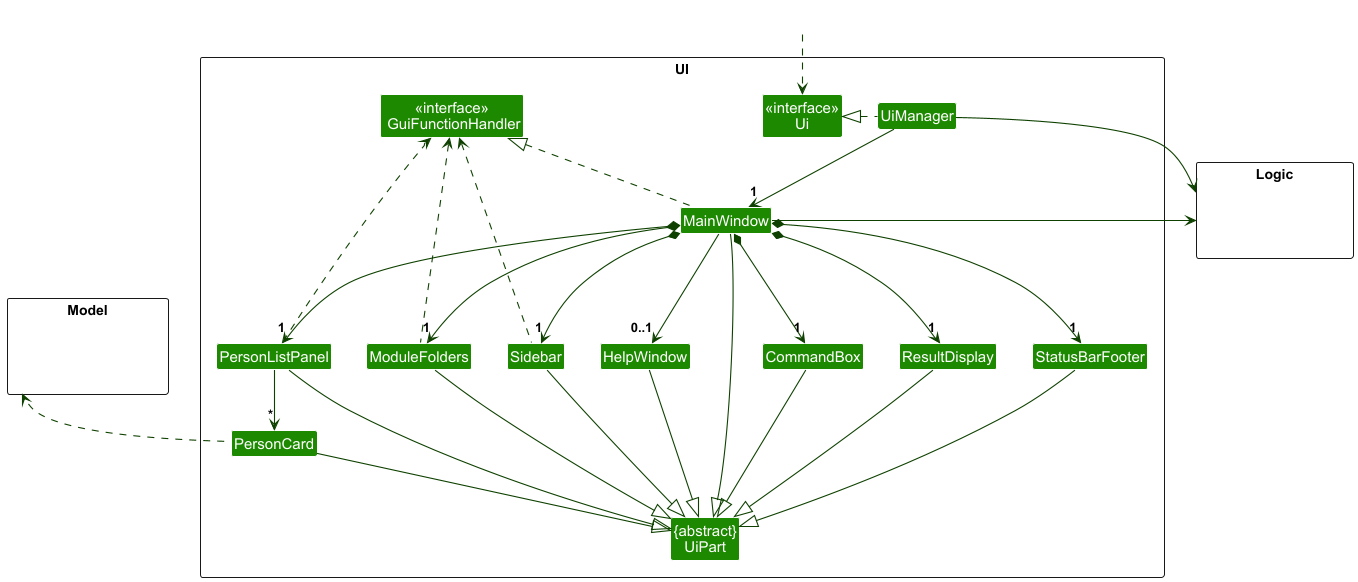
The UI consists of a MainWindow that is made up of parts e.g.CommandBox, ResultDisplay, PersonListPanel, StatusBarFooter etc. All these, including the MainWindow, inherit from the abstract UiPart class which captures the commonalities between classes that represent parts of the visible GUI.
The UI component uses the JavaFx UI framework. The layout of these UI parts are defined in matching .fxml files that are in the src/main/resources/view folder. For example, the layout of the MainWindow is specified in MainWindow.fxml
The UI component,
- executes user commands using the
Logiccomponent. - listens for changes to
Modeldata so that the UI can be updated with the modified data. - keeps a reference to the
Logiccomponent, because theUIrelies on theLogicto execute commands. - depends on some classes in the
Modelcomponent, as it displaysPersonobject residing in theModel.
The GuiFilterHandler component handles the mouse and key events on the GUI. This component is inherited by MainWindow and controls events done on PersonListPanel, ModuleFolders and Sidebar component.
Logic component
API : Logic.java
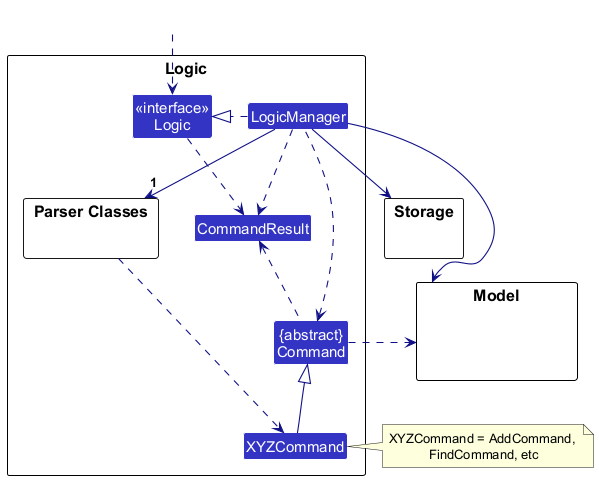
Here’s a (partial) class diagram of the Logic component:
The sequence diagram below illustrates the interactions within the Logic component, taking execute("delete 1") API call as an example.
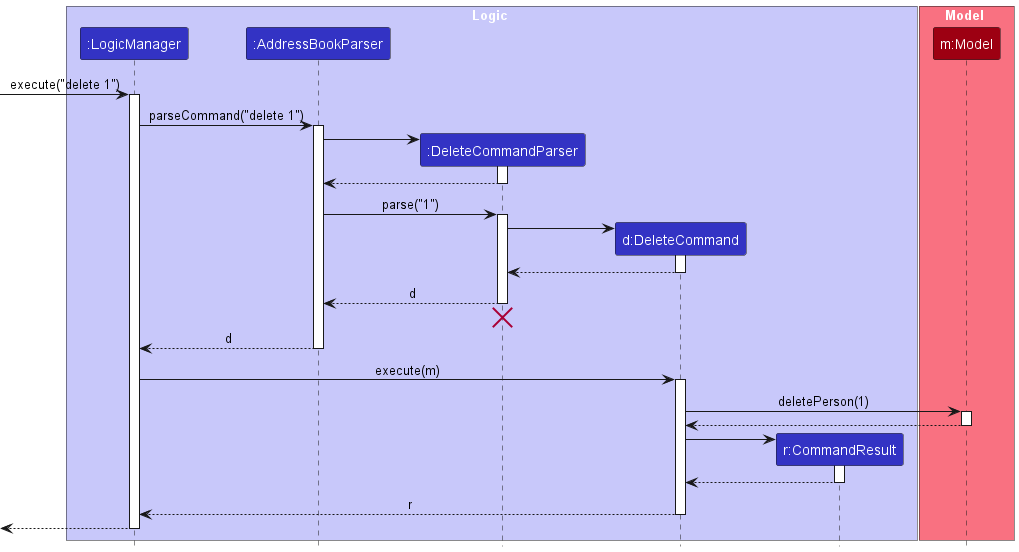
 Note: The lifeline for
 DeleteCommandParser should end at the destroy marker (X) but due to a limitation of PlantUML, the lifeline continues till the end of diagram.
How the Logic component works:
- When
Logicis called upon to execute a command, it is passed to anAddressBookParserobject which in turn creates a parser that matches the command (e.g.,DeleteCommandParser) and uses it to parse the command. - This results in a
Commandobject (more precisely, an object of one of its subclasses e.g.,DeleteCommand) which is executed by theLogicManager. - The command can communicate with the
Modelwhen it is executed (e.g. to delete a person).
Note that although this is shown as a single step in the diagram above (for simplicity), in the code it can take several interactions (between the command object and theModel) to achieve. - The result of the command execution is encapsulated as a
CommandResultobject which is returned back fromLogic.
Here are the other classes in Logic (omitted from the class diagram above) that are used for parsing a user command:
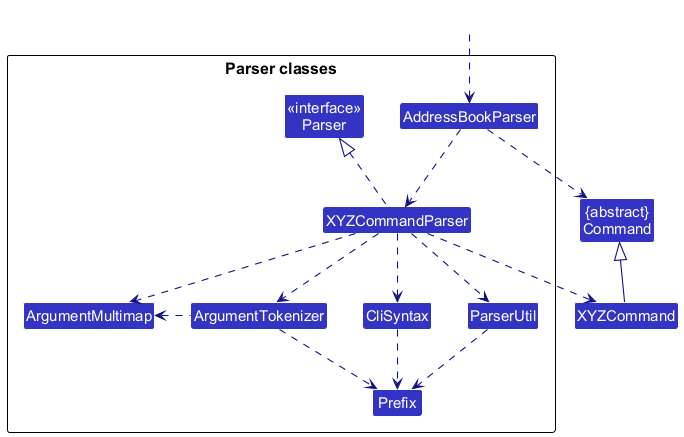
How the parsing works:
- When called upon to parse a user command, the
AddressBookParserclass creates anXYZCommandParser(XYZis a placeholder for the specific command name e.g.,AddCommandParser) which uses the other classes shown above to parse the user command and create aXYZCommandobject (e.g.,AddCommand) which theAddressBookParserreturns back as aCommandobject. - All
XYZCommandParserclasses (e.g.,AddCommandParser,DeleteCommandParser, …) inherit from theParserinterface so that they can be treated similarly where possible e.g, during testing.
The sequence diagram below is another example to illustrate the interactions within the Logic component, taking execute("find n/John mm/2103") API call as an example.
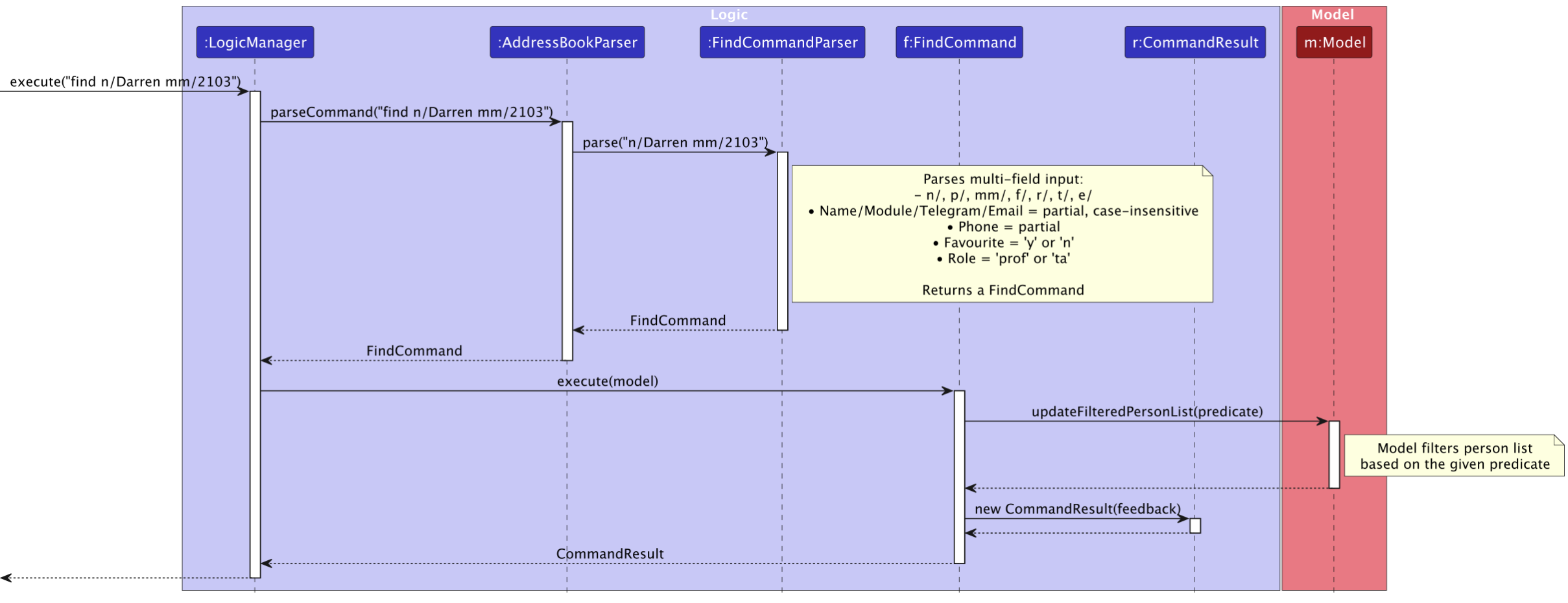
Note: The lifeline for FindCommandParser should end at the destroy marker (X) but due to a limitation of PlantUML, the lifeline continues till the end of diagram.
Model component
API : Model.java
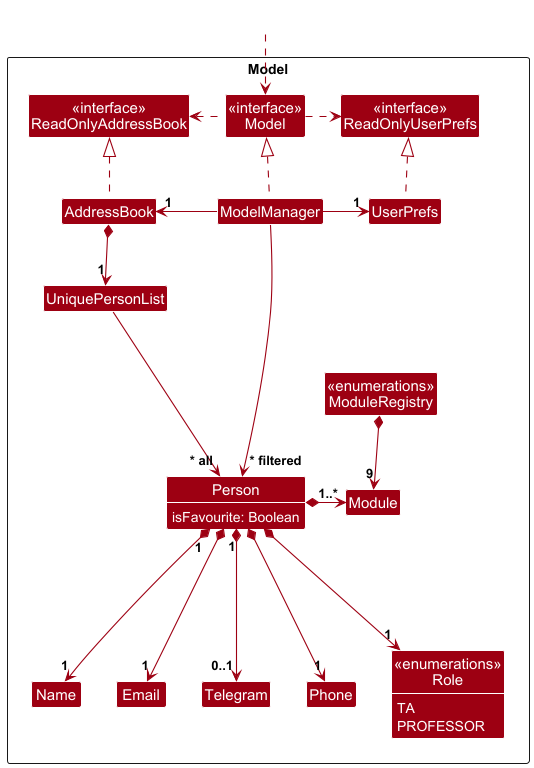
The Model component,
- stores the address book data i.e., all
Personobjects (which are contained in aUniquePersonListobject). - stores the currently ‘selected’
Personobjects (e.g., results of a search query) as a separate filtered list which is exposed to outsiders as an unmodifiableObservableList<Person>that can be ‘observed’ e.g. the UI can be bound to this list so that the UI automatically updates when the data in the list change. - stores a
UserPrefobject that represents the user’s preferences. This is exposed to the outside as aReadOnlyUserPrefobjects. - does not depend on any of the other three components (as the
Modelrepresents data entities of the domain, they should make sense on their own without depending on other components)
Storage component
API : Storage.java
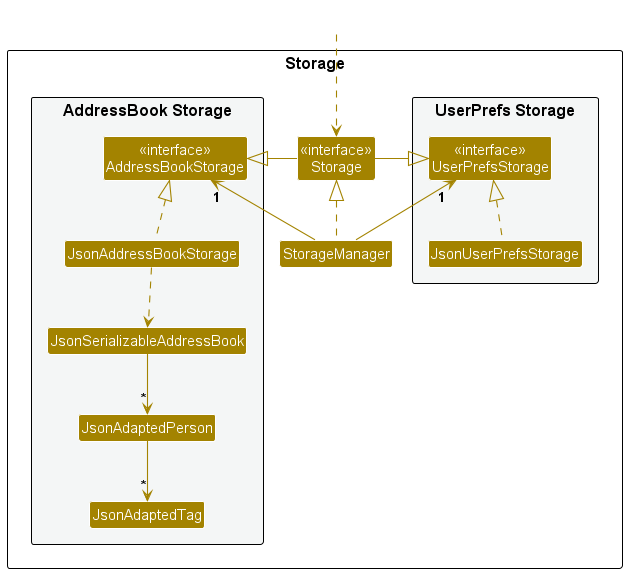
The Storage component,
- can save both academy source data and user preference data in JSON format, and read them back into corresponding objects.
- inherits from both
AddressBookStorageandUserPrefStorage, which means it can be treated as either one (if only the functionality of only one is needed). - depends on some classes in the
Modelcomponent (because theStoragecomponent’s job is to save/retrieve objects that belong to theModel)
Common classes
Classes used by multiple components are in the seedu.address.commons package.
Implementation
This section describes some noteworthy details on how certain features are implemented.
[Proposed] More Modules
Proposed Implementation
Modules can be added or removed by users.
Current Implementation:
There is fixed amount of modules inside ModuleRegistry as enums. Users can add modules to a contact using the add or edit commands.
| Module Code | Module Name |
|---|---|
| CS1231S | Discrete Structures |
| CS2030S | Programming Methodology II |
| CS2040S | Data Structures and Algorithms |
| CS2100 | Computer Organisation |
| CS2103T | Software Engineering |
| CS2106 | Introduction to Operating Systems |
| CS2109S | Introduction to AI and Machine Learning |
| CS3230 | Design and Analysis of Algorithms |
| CS2101 | Effective Communication for Computing Professionals |
Future Implementation:
The future functionality of the ModuleRegistry system will enable users to dynamically manage modules.
Summary of Key Features:
- Add modules: Allow users to add modules.
- Remove modules: Allow users to delete user-added modules.
- Display modules: Show both preset and user-added modules.
- Fixed set of preset modules: The core set of modules cannot be modified by users.
This functionality will enable users to customize their experience with modules while preserving the integrity of the default set.
Documentation, logging, testing, configuration, dev-ops
Appendix: Requirements
Product scope
Target User Profile:
- Has difficulty contacting professors and teaching assistants
- Often misplaces or loses important contact information
- Prefers using desktop applications over web or mobile alternatives
- Favors keyboard input over mouse-based interactions
- Feels comfortable using command-line interface (CLI) applications
Value Proposition: A streamlined CLI desktop application that makes it easy for students to access and manage contact details for Professors and TAs—all in one place.
User stories
Priorities: High (must have) - * * *, Medium (nice to have) - * *, Low (unlikely to have) - *
| Priority | As a … | I want to … | So that I can… |
|---|---|---|---|
* * * |
user | have my professors and TA’s contact | contact them in the future |
* * * |
new user | have a guide | navigate around and use the app easily |
* * * |
user | set my contacts as TA or professor | find them in one command |
* * * |
user | set my contacts as favourite | find them in one command |
* * * |
user | find contact(s) by full/incomplete name(s) | locate contact details without having to go through the entire list and remembering the full name |
* * * |
user | find contact(s) by full/incomplete module code(s) | locate contact details without having to go through the entire list and remembering the full module code |
* * * |
user | find contact(s) by full/incomplete phone number(s) | locate contact details without having to go through the entire list and remembering the full phone number |
* * * |
user | find contact(s) by full/incomplete email(s) | locate contact details without having to go through the entire list and remembering the full email address |
* * * |
user | list all contacts | view of all my contact details |
* * * |
user | delete contacts | remove outdated contacts |
* * |
user | mass operations | make a lot of changes to my contact list efficiently |
* * |
user | have a console window to display the contact | copy and paste contact information efficiently |
* * |
user | add Telegram handle to contacts | keep their telegram handle for easy contact |
* * |
user | find contact(s) by full/incomplete telegram handle(s) | locate contact details without having to go through the entire list and remembering the full telegram handle |
* * |
user | find contact(s) by multiple fields | locate specific contact details in one command |
* * |
user | have contacts organised by modules | quickly access contacts that belong to the module group with a click of a button |
* * |
user | have contacts organised by favourite | quickly access favourite contacts with a click of a button |
* |
user | have a personal contact list | locate contact details important to me |
* |
user | add contacts to the personal contact list | add important contacts to the list |
* |
user | delete contacts from the personal contact list | remove no longer important contacts from the list |
* |
user | list my personal contact list | view every contact in the list |
Use cases
(For all use cases below, the System is the AcademySource and the Actor is the user, unless specified otherwise)
Use case: UC01 - Add a contact
MSS
- User requests to add a contact
-
AcademySource adds a contact
Use case ends.
Extensions
-
2a. The given command consists of invalid syntax.
-
2a1. AcademySource shows an error message.
Use case resumes at step 1.
-
Use case: UC02 - List contacts
MSS
- User requests to list contacts
-
AcademySource shows a list of contacts
Use case ends.
Extensions
-
2a. The list is empty.
Use case ends.
Use case: UC03 - Delete a contact
MSS
- User requests to list contacts (UC02)
- User requests to delete a specific contact in the list
-
AcademySource deletes the contact
Use case ends.
Extensions
-
2a. The given index is invalid.
-
2a1. AcademySource shows an error message.
Use case resumes at step 1.
-
-
3a. The user give multiple indexes
-
3a1. AcademySource deletes all the corresponding contacts in the current list.
Use case ends
-
Use case: UC04 - Find contact(s) by name(s)
MSS
- User requests to find contact(s) using any of full/incomplete name(s).
-
AcademySource shows a list of contacts matching the search.
Use case ends.
Extensions
-
1a. The provided name(s) does not follow the syntax.
-
1a1. AcademySource shows an error message
Use case resumes at step 1.
-
-
2a. No contacts match the provided full/partial name(s).
-
2a1. AcademySource shows an empty list.
Use case ends.
-
Use case: UC05 - Edit a contact
MSS
- User requests to edit a contact by providing components to be edited
-
AcademySource updates the corresponding component of the contact.
Use case ends.
Extensions
- 2a. One of the component provided by user is invalid
-
2a1. AcademySource shows an error message
Use case ends.
-
Use case: UC06 - Find contact(s) by module, email, role, and favourite
MSS
- User requests to find contact(s) by providing full/partial module code(s), full/partial email(s), role, and favourite status.
-
AcademySource shows a list of contacts matching the search.
Use case ends.
Extensions
-
1a. The provided module code(s), email(s), role, and/or favourite status does not follow the syntax.
-
1a1. AcademySource shows an error message.
Use case resumes at step 1.
-
-
2a. No contact match the provided module code(s), email(s), role, and favourite status.
-
2a1. AcademySource shows an empty list.
Use case ends.
-
Use case: UC07 - Favourite a contact
MSS
- User requests to list contacts (UC02)
- User requests to label a specific contact as favourite in the list
-
AcademySource labels the contact as favourite
Use case ends.
Extensions
-
2a. The given index is out of range.
-
2a1. AcademySource shows an error message.
Use case resumes at step 1.
-
-
2b. The user provided multiple indexes.
-
2b1. AcademySource shows an error message.
Use case resumes at step 1.
-
-
3a. The specified user is already a favourite contact.
-
3a1. AcademySource labels the contact as a non-favourite contact.
Use case ends.
-
Use case: UC08 - Clear contact(s)
MSS
- User requests to list contacts (UC02).
- User requests to clear all contact(s).
-
AcademySource clears every contact in the contact list.
Use case ends.
Use case: UC09 - Help
MSS
- User requests help to use AcademySource.
- AcademySource provides the user with URL to AcademySource website.
-
User copies the URL to device’s clipboard.
Use case ends.
Use case: UC10 - Exit
MSS
- User requests to exist the app.
-
GUI for AcademySource closes.
Use case ends.
Non-Functional Requirements
- Should work on any mainstream OS as long as it has Java
17or above installed. - Should be able to hold up to 1000 contacts without a noticeable sluggishness in performance for typical usage.
- A user with above average typing speed for regular English text (i.e. not code, not system admin commands) should be able to accomplish most of the tasks faster using commands than using the mouse.
- All commands should produce expected result with no more than 3 seconds delay.
- Application should not occupy more than 50MB on hard disk.
- Application should be user-friendly to first time users.
- The application should support seamless upgrades without data loss.
- Comprehensive documentation should be available for users and developers.
Glossary
- Mainstream OS: Windows, Linux, Unix, MacOS
- Operations: Any command-line input by the user.
- Data: Contact data stored in the data/academysource.json.
- CLI syntax table: A structured reference that outlines the syntax, parameters and usage of command-line interface commands that helps the users to execute operations.
- Contact: An information that holds name, email, telegram handle, phone number, module, role.
- Module: Any NUS course.
- Role: TA / Professor
Appendix: Instructions for manual testing
Given below are instructions to test the app manually.
Note: These instructions only provide a starting point for testers to work on;
testers are expected to do more exploratory testing.
Launch and shutdown
-
Initial launch
-
Download the jar file and copy into an empty folder
-
Double-click the jar file, or alternatively, type
java -jar academysource.jarinto your terminal in the directory holding theacademysource.jarfile and press enter. Expected: Shows the GUI with a set of sample contacts. The window size may not be optimum. -
Saving window preferences
-
Resize the window to an optimum size. Move the window to a different location. Close the window.
-
Re-launch the app by repeating step 2.
Expected: The most recent window size and location is retained.
-
-
Shutdown
- In the AcademySource GUI command box, enter
exit. Expected: the GUI for AcademySource closes.
- In the AcademySource GUI command box, enter
Add contact
-
Add a contact while all contacts are being shown
-
Prerequisites: List all contacts using the
listcommand. Ensure there are no contacts with the same name and telegram handles as any of the test cases provided below. Perform the following test cases sequentially. -
Test case:
add n/John Doe p/98765432 e/johnd@example.com t/@johnacademysource r/TA m/CS2103T
Expected: The contact will be added to the list. Details of the added contact shown in the status message. -
Test case:
add n/John Doe p/98765432 e/johnd@example.com t/@johnacademysource1 r/PROF m/CS2101
Expected: No contact added to the list due to the name. Error details shown in the status message. -
Test case:
add n/Robin p/98765432 e/johnd@example.com t/@johnacademysource r/PROF m/CS2101
Expected: No contact added to the list due to the telegram handle. Error details shown in the status message. -
Other incorrect add commands to try:
add n/NAME p/PHONE e/EMAIL t/TELEGRAM r/ROLE m/MODULE(where either NAME, PHONE, EMAIL, TELEGRAM, ROLE, or MODULE is empty or is invalid)
Expected: No contact added to the list. Error details shown in the status message.
-
Deleting contact(s)
-
Deleting a contact while all contacts are being shown
-
Prerequisites: List all contacts using the
listcommand. Multiple contacts in the list. -
Test case:
delete 1
Expected: First contact is deleted from the list. Details of the deleted contact shown in the status message. -
Test case:
delete 0
Expected: No contact is deleted. Error details shown in the status message. -
Other incorrect delete commands to try:
delete,delete x(where x is larger than the list size)
Expected: Similar to previous.
-
-
Deleting multiple contacts while all contacts are being shown
-
Prerequisites: List all contacts using the
listcommand. Minimally 4 contacts in the list. -
Test case:
delete 1 2 3
Expected: First three contacts are to be deleted from the list. Details of the deleted contacts shown in the status message. -
Test case:
delete 0 1
Expected: No contact to be deleted. Error details shown in the status message. -
Test case:
delete 1 1
Expected: No contact to be deleted. Error details shown in the status message.
-
Edit contact
-
Edit a contact while all contacts are being shown
-
Prerequisites: List all contacts using the
listcommand. Minimally 2 contact in the list. Ensure there are no contacts with the same name and telegram handles as any of the test cases provided below. Perform the following test cases sequentially. -
Test case:
edit 1 n/Jon Jones m/CS2106 m/CS3230 t/jonnyboy
Expected: First contact’s name, module, and telegram will be changed. Details of the edited contact will be shown in the status message. -
Test case:
edit 2 n/Jon Jones
Expected: No contact to be edited due to invalid name. Error message to be shown in the status message. -
Test case:
edit 2 t/jonnyboy
Expected: No contact to be edited due to invalid telegram handle. Error message to be shown in the status message. -
Other incorrect add commands to try:
edit x n/NAME p/PHONE e/EMAIL m/MODULE t/TELEGRAM, where either:- x is either less than 1 or larger than the size of the list OR
- one of NAME, PHONE, EMAIL, MODULE, and TELEGRAM is blank or invalid
Expected: No contact to be edited. Error message to be shown in the status message.
- x is either less than 1 or larger than the size of the list OR
-
Find contact(s)
-
Find contact(s)
-
Prerequisites: Enter the following command,
add n/James Tan p/81234567 e/jamestan@example.com t/@jamestan r/PROF m/CS2040S.-
If a contact with the name or telegram already exists, and the role is
PROF, edit that contact to match the contact above. (e.g. if contact is at index 1, enteredit 1 n/James Tan p/81234567 e/jamestan@example.com t/@jamestan m/CS2040S) -
If a contact with the name or telegram already exists, and the role is
TA, delete that contact and enter the add command above. (e.g. if contact is at index 1, enterdelete 1)
-
-
Test case:
find n/james
Expected: The added/edited contact above to be shown. -
Test case:
find p/81234 e/jamestan r/PROFExpected: The added/edited contact above to be shown. -
Test case:
find n/james david peter mm/2040s 2100 t/tan f/n
Expected: The added/edited contact above to be shown. -
Incorrect find commands to try:
find n/NAMES p/PHONES e/EMAILS t/TELEGRAMS mm/MODULES r/ROLE f/FAVOURITE(where one of NAMES, PHONES, EMAILS, TELEGRAMS, MODULES, ROLE, FAVOURITE is blank or invalid)
Expected: Error message to be shown in the status message.
-
Favourite/Un-favourite contact
-
Favourite a contact while all contacts are being shown
-
Prerequisites: List all contacts using the
listcommand. Multiple contacts in the list.- If the first contact in the list is already labelled as favourite, enter
fav 1to un-favourite the contact.
- If the first contact in the list is already labelled as favourite, enter
-
Test case:
fav 1
Expected: First contact will be labelled as favourite. Details of the new favourite contact to be shown in the status message. -
Test case:
fav 0
Expected: No contact is labelled as favourite. Error details shown in the status message. -
Other incorrect favourite commands to try:
fav,fav x(where x is larger than the list size)
Expected: Similar to previous.
-
Saving data
- Dealing with missing data files
- Download jar file and copy it into an empty folder. Run the jar file to create a
academysource.jsonfile in thedatafolder. - Enter
exitcommand to exit the application. - Delete the
datafolder created in step 1, to simulate a missing data file. -
Run the jar file.
Expected: A new
academysource.jsonfile is created and populated with default data.
- Download jar file and copy it into an empty folder. Run the jar file to create a
- Dealing with corrupted data files
- Download jar file and copy it into an empty folder. Run the jar file to create a
academysource.jsonfile in thedatafolder. - Enter
exitcommand to exit the application. - Open the
academysource.jsonfile created in step 1, delete anamefield in a random contact in the file to simulate a corrupted data file. -
Run the jar file.
Expected:
academysource.jsonnow contains no contact details. -
Delete the
academysource.jsonfile and run the jar file again.Expected: A new
academysoure.jsonfile is created and populated with default data.
- Download jar file and copy it into an empty folder. Run the jar file to create a